01
Native macOS utility
CodexCoffee
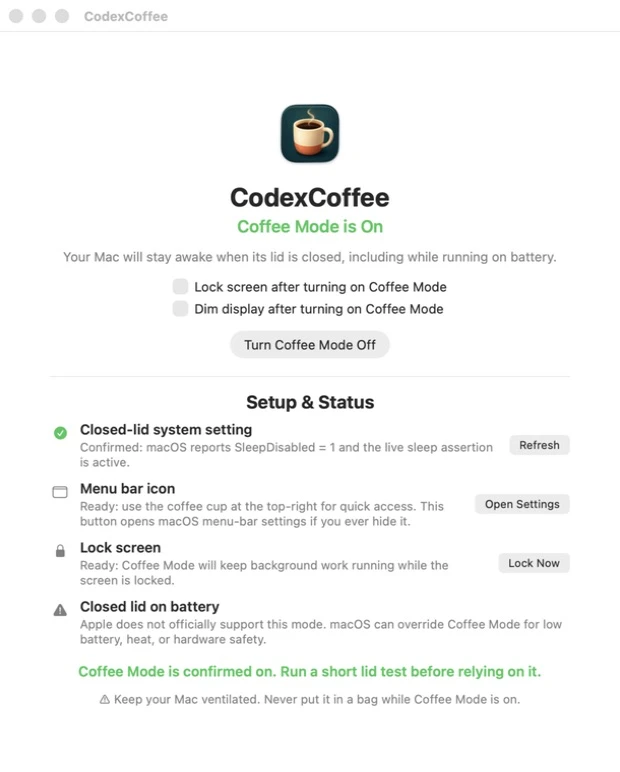
Keeps a Mac notebook working behind a closed lid, with the state, safeguards, and everyday controls visible in one place.
Native utility · macOS · Active development
The purpose
Keep the work running. Make the risk visible.
Long-running renders, transfers, and development tasks do not always belong on an open notebook. CodexCoffee creates a deliberate closed-lid workflow while keeping confirmation, battery, heat, and ventilation guidance in front of the operator.
What it does
A small control surface for a system-wide state.
02
Lives where it is useful
A normal app window, Dock presence, and coffee-cup menu-bar control keep status and actions close at hand.03
Handles the screen
Independent lock and brightness controls can secure the session and reduce display power without hiding their state.04
Restores normal sleep
Turning Coffee Mode off—or completing a normal quit—returns the Mac to its expected lid-close behavior.Design approach
Serious behavior presented as a calm, readable utility.
The interface pairs one primary action with a plain-language setup checklist. Green confirmation is reserved for a verified ready state; warnings remain visible because the system can still respond to low battery, temperature, or hardware protection.
Apple does not officially support closed-lid operation on battery. Coffee Mode can create heat and should only be used on a hard, ventilated surface—never inside a bag.